



Is it time to switch to OLED gaming monitors? We weigh this decision with our review of the ASUS ROG Strix OLED XG27AQDMES gaming monitor.
Full disclaimer, ASUS Philippines has lent me the unit for this review. This is not a paid or sponsored post, so all thoughts here are my own. The ASUS ROG Strix OLED XG27AQDMES is a 27-inch QHD gaming monitor that’s built around a QD-OLED panel. It offers a 240Hz refresh rate and ASUS-rated 0.03ms GTG response time. On paper, it’s the kind of specs that immediately get the attention of PC gamers.
Inside the Box
Before everything else, let’s see what it comes with out-of-the-box. Again this is a loaned unit and there may be some differences with the retailed product.

Of course we have the monitor itself, the stand, and its base inside the box. It also has a VESA quick release mount, as well as a few stickers and the warranty booklet, as well as a few cables: display port, HDMI, and power cable. All neatly kept inside an organizer bag.
Why OLED over IPS?
Before my main thoughts about the monitor, I’d like to cover a few points first; why choose OLED over IPS. IPS monitors are still an excellent choice for many gamers. But OLED has a few characteristics that are just difficult to ignore once you see them side-by-side.

The biggest one is contrast. OLED pixels can effectively turn themselves off when displaying black, there is no backlight glow like what you would get on an IPS display. This means that you will get the deepest blacks. OLED displays also usually have advantages in color reproduction, response time, and physical design.
Of course, OLED isn’t automatically better at everything. There are still considerations like brightness, OLED-specific care features, and the higher price compared to IPS monitors. So in this review, we’ll also check out if the features and benefits of the ASUS ROG Strix OLED XG27AQDMES gaming monitor is worth its price tag.
Design and Build Quality

The ROG Strix OLED XG27AQDMES has the same design language as any ROG monitor. But it doesn’t go overboard on the gaming aesthetic. The panel itself is thin and doesn’t look bulky on the desk. The mount part that connects to the stand is a bit bulky though since the power brick is built-in the monitor itself. But it’s not really noticeable from the front, even on the sides.
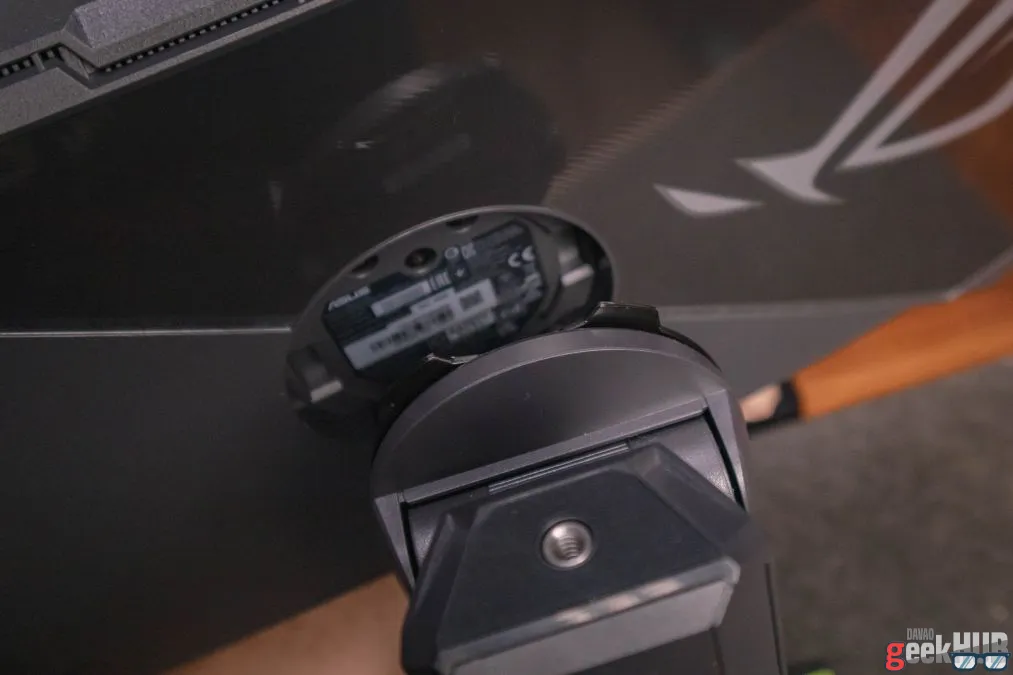

Speaking of the stand, it has a quick release mount for the monitor. You can easily and quickly remove it from the stand and quickly mount it to its VESA quick release mount, or another quick release stand. This feature is actually useful, but probably only to few people. Most users will just either use the stand or mount it a VESA mount and that’s it, they don’t really move it around. The users that will find this useful would be those who have multiple setups or reviewers such as myself. In my honest opinion though, it would be better to just remove the convenience of quick release to lower its price tag.

Quick release aside, the monitor stand is built and designed pretty well. It’s very sturdy and gives plenty of adjustment options. We have about up to 110mm of height adjustment, ±45° swivel, ±90° pivot, and a -5° to +20° tilt. Lastly, it has a standard ¼-inch tripod thread on top of the stand where you can mount you camera.
Display Quality
The display’s quality is its biggest strength. It has a 27-inch QD-OLED panel with a 2560×1440 resolution. 1440p is still a sweet spot on gaming for me, you get sharper image than 1080p without needing the huge GPU horsepower needed for 4K gaming at high refresh rates.

Speaking of refresh rates, the ROG Strix OLED XG27AQDMES offers up to 240Hz. This makes movement looks noticeable smoother. Combined with its quick response time, it’s perfect for fast-paced gaming.

Color reproduction is another of its strong point. ASUS rates the panel at 99% DCI-P3, with true 10-bit color supporting 1.07 billion colors and a Delta E of less than 2. It also supports HDR10 and carries a VESA DisplayHDR True Black 400 rating.
HDR brightness is pretty decent on this monitor, but I’ve seen others that are brighter. That’s one thing to note if you’re looking for a really bright screen. Instead, contrast on this monitor is exceptional. I’ve tested it using the EZIO monitor test and found that the panel looked excellent. Blacks were really deep and didn’t notice any bleeding along the edges. Text was also very sharp in my normal use.
Gaming Performance

I’ve only ever tested the monitor in one game, Cyberpunk 2077. I believe it was a great game to appreciate what OLED can do. Nighttime scenes benefit greatly from the deep blacks and not have washed out appearances. And bright elements such as Night City’s neon lighting stand out nicely around those darker surroundings.
Its high refresh rate also play a big part in the gaming experience. Combined with its compatibility with G-SYNC and AMD FreeSync Premium, movement feels smooth and responsive. There more features centered around gaming but didn’t really dive into them much as most users won’t probably use them. But it’s still nice having the options available.
Everyday Use

The ROG Strix OLED monitor might be designed for gaming, but it also performs great in everyday use. 1440p resolution is also comfortable for every day desktop use. It looks very sharp and didn’t encounter any text clarity issues. It’s also great for media work like photo or video editing thanks to its great color reproduction.
OLED Care Pro and Neo Proximity Sensor
Aside from the high price tag, image retention and burn-in is a major concern for OLED monitors. That’s why manufacturers now have developed various features designed to reduce those risks. ASUS’ OLED Care Pro has various features to care for the screen. One of them which I’ve come to always use is pixel cleaning. OLED Care Pro can be managed through ASUS’ DisplayWidget Center software.

Another feature worth noting is the Neo Proximity Sensor. Basically it turns off the screen when it detects that the user left within the set amount of time. And when the user returns, it automatically turns back on again. The distance of the proximity sensor can also be adjusted to cater to different desk setups. It’s a simple feature but makes a lot of sense. If you’re away from your computer, there’s no reason for an OLED screen to remain displaying the same static display.

You can actually see the sensor activating through the camera lens, like a red led light blinking. It’s not visible with the naked eye though.
Though OLED burn-in is a concern, ASUS has taken the initiative and included it in the coverage of their three-year warranty. Warranty terms may vary though, so it’s best to make sure and double check with the seller/store first.
Connectivity
For connectivity, port selection is pretty straightforward. We get one DisplayPort 1.4 with DSC, two HDMI 2.1 ports, and a 3.5mm headphone jack. There’s also a USB-C port but don’t expect it to be display input. It’s only used for updating the monitor’s firmware.
Our Verdict

The ASUS ROG Strix OLED XG27AQDMES checks a lot of important boxes. The panel looks excellent, especially when displaying dark scenes. The blacks are very deep and colors are great. And the high refresh rate makes it a very capable gaming monitor. ASUS has also gone beyond OLED protection with OLED Care Pro and the Neo Proximity Sensor.
One heavy caveat though is the price. OLED monitors are notoriously pricey, and the ROG Strix OLED XG27AQDMES is no exception. During its Philippine launch, it was priced at ₱39,000, significantly higher that an IPS monitor. But some stores offer it now for around ₱35,000, which can be quite compelling.
So is it worth it? Depends on who’s looking to buy really. It’s definitely a premium OLED gaming monitor with an also premium price tag. Casual gamers or students that doesn’t have deep wallets may just need to stick to IPS monitors instead. But for serious gamers who are also professionals who require reference-grade color accuracy and high refresh rates, an OLED monitor is a must. And the XG27AQDMES makes a strong argument for itself.
Specifications
| Panel Size | 26.5 inch |
| Panel Type | QD-OLED |
| Resolution | 2560×1440 |
| Aspect Ratio | 16:9 |
| Color Space (DCI-P3) | 99% |
| Brightness (Typ.) | 200 nits |
| Brightness (HDR, Peak) | 400 nits |
| Refresh Rate | 240Hz |
| Response Time | 0.03ms |
| HDR Support | HDR10 |
| Nvidia G-Sync/AMD Freesync | Yes |
| Other Features | Quick Release Mount OLED Care Pro Neo Proximity Sensor AI Assistant Technology |
| I/O Ports | Display Port 1.4 x1 HDMI 2.1 Port x2 Earphone Jack |
| VESA Support | Yes |
| Price | ~₱35,000 |
Price and Availability
The ASUS ROG Strix OLED XG26AQDMES is priced at around ₱35,000 and is available at official ASUS and Republic of Gamers stores and retailers nationwide.
Summary
ASUS ROG Strix OLED XG27AQDMES- Design and Build4.5/5 Very GoodSlim, well-built, and highly adjustable stand
- Display Quality5/5 AmazingExcellent QD-OLED contrast, color, and sharp images
- Gaming Performance5/5 Amazing240Hz refresh rate makes for a great gaming experience
- Features4.5/5 Very GoodOLED Care Pro and the Neo Proximity Sensor are very useful
- Connectivity4/5 GoodDisplayPort and HDMI cover the essentials, but USB-C is limited
- Value4/5 GoodHigh price tag but still quite compelling
The Good
- Excellent OLED contrast and deep blacks
- No edge light bleeding
- 240Hz refresh rate
- Useful OLED Care Pro features
- Neo Proximity Sensor is very useful
The Bad
- HDR brightness could be better
- USB-C is only for firmware updates

