

AI-powered laptops are now filling the market, and we had one of the new ones from ASUS. This is my ASUS Vivobook S16 Review.
For full disclosure ASUS Philippines has agreed to lend us the Vivobook S16 for us to review. But I will be honest with my opinions about the device. I had the device for a couple of weeks now and this is what I think about it.
What it comes with Out-of-the-Box
There’s not really much inside of the box, we just have the device itself, its 65W USB-C charger, and the user guide and warranty booklet. The retail version will probably include a few bundles depending on where you buy it. I believe it may include an ASUS Nereus Backpack. You can check out my unboxing and impressions video below.
Design and Build Quality


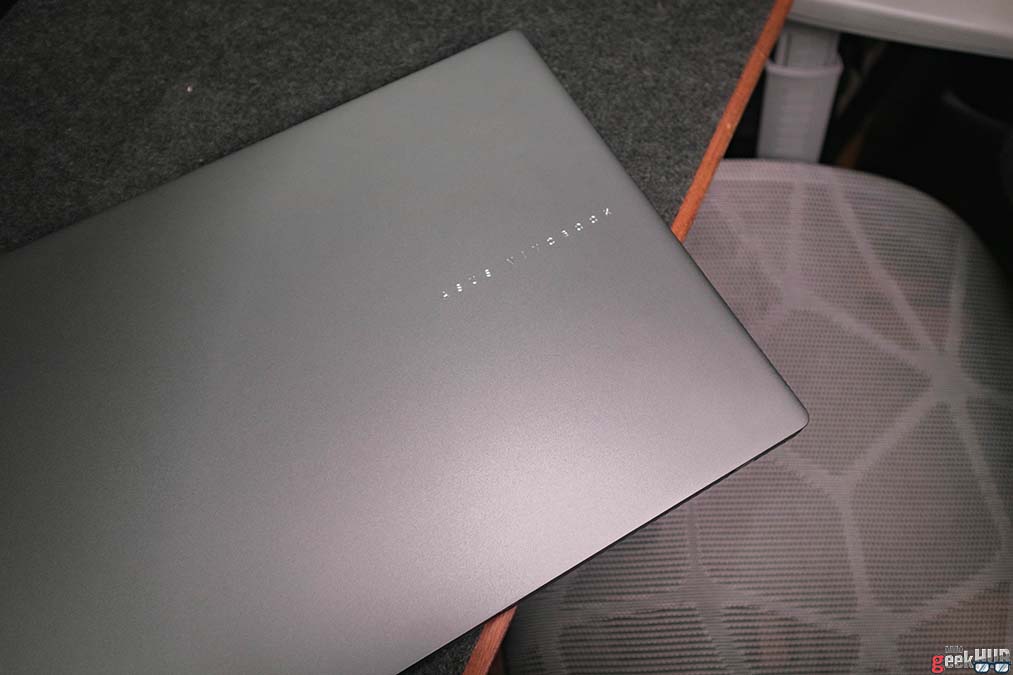
The device has a very minimal look, compared to previous designs. I actually prefer it this way, it’s sleek and sexy. The ASUS Vivobook branding is a bit smaller, but it’s engraved in silver so it is still noticeable. ASUS has included a few I/O ports for peripherals. It’s just a few, but enough for your usual tasks. It has 2 USB-A ports, 2 USB-C ports (1 for charging), an HDMI port, and an audio jack. But I don’t like the fact that it doesn’t have an SD or MicroSD card slot though. It also has a full-metal cover, making it not just look good, but also makes it more robust.
Although it has a full-metal cover and base, it’s actually not that heavy. In fact, it’s actually quite light. It only weighs around 1.7 kg, and is only just 15.9mm thin. This makes it portable, considering it has a 16-inch screen.
Display Quality

Speaking of its screen, it has a 16-inch WUXGA large display. It has a 1920×1200 resolution, so we have plenty of vertical space. This extra screen real estate is perfect for creatives. We have plenty of room for photo and video editing. We can also see a lot more cells in a spreadsheet thanks to the extra vertical space. It also supports 144Hz refresh rate for smooth stutterless visuals.
Color accuracy is not perfect, but good enough for photo editing tasks. That combined with an anti-glare coating also results in a pleasurable viewing experience when watching movies and videos. The display is not OLED, so we don’t exactly get the deepest blacks, but it still looks pretty nice. It’s an IPS-level screen, so you can have a great viewing experience in every angle.
Audio Quality
To complement the display, is its speakers. It’s located underneath at the sides, and it’s surprisingly loud and clear. It’s also tuned with Dolby Atmos, making watching movies more immersive. It’s pretty good when you watch alone in your room, but a bit lacking on a much larger room.
I also find listening to music a bit lacking. I personally find the soundstage a bit small, even with Dolby Atmos. It has decent mids, and an okay bass, but highs are pretty unsatisfactory at least for me. If you do want to listen to music or do audio intensive tasks, I do suggest using a good pair of headphones/headset.
90% Keyboard and Large Trackpad

To add to productivity, ASUS has added a large trackpad for better and comfortable navigation. It also supports ASUS gestures that can help with productivity, and a special fingerprint resistant coating.
The device also feature a 90% layout keyboard with a dedicated numpad. It is a chiclet keyboard but I do feel that it’s a higher key compared to most laptops. It also has a deep stroke and a tactile feel, so typing doesn’t really feel bad. Not better than a regular mechanical keyboard though, but good enough for a laptop while working on-the-go. Lastly, it has a dedicated Copilot key for easy access to your AI companion.
IR Webcam

Picture quality on the webcam is not the best, but it’s decent enough for Zoom meetings. It shows a bright image but also introduces a bit of noise in the image, even in decent lighting environments.
However, I do like that it includes an LED indicator for when the webcam is in use, and a privacy cover for security. It also has an infrared camera for Windows Hello facial recognition.
Day-to-Day Performance

The Vivobook S16 packs an Intel Core Ultra 7 225H processor which is plenty for everyday productivity use. Having multiple tabs of office apps is just a breeze on this device. Its 16GB RAM helps with this. It can also run apps frequently used by creatives with no problems. I have used Adobe Photoshop for photo editing, DaVinci Resolve for video editing, as well as Fusion 360 for making 3D models.
What the Vivobook S16 excel on though is its battery life, which we’ll talk about later. For now, here are some benchmark results to give you a numerical representation on how it performs. Surprisingly, it scored great on Cinebench.


- PCMark = 5,971
- 3DMark Storage = 1,687
- Cinebench Single Core = 1,866
- Cinebench Multi Core = 12,977
- Geekbench Single Core = 2,487
- Geekbench Multi Core = 11,299
- Geekbench AI = 12,445
Is it Good for Gaming?
On paper, the device features Intel Arc Graphics, but it didn’t show on any benchmarking apps though. It just says Intel Graphics. Nevertheless, I did try to play Clair Obscur: Expedition 33 on it and it was so laggy. It was on low settings as well. But it should run non-demanding games like Dota 2 with no problem on medium settings.
I’ve also tested it on some benchmarks below.
Battery Life
The battery life is probably one of the Vivobook S16’s best feature. ASUS boasts that it can go up to 20 hours off battery life, but that’s probably when the device is on standby. On my regular use though, I actually got up to 8 hours of usage. This is a combination of web browsing, writing articles, and a bit of photo editing, with rest in between.
It also charges fast so I found myself not worrying about not having enough power through the day.
Our Verdict

The Vivobook S16 (S3607C) is a great laptop for your everyday tasks. Its large screen, large trackpad, and great battery life definitely adds to your productivity. The display and audio is also perfect for movie nights. But if you’re a video editor or works with graphics, this device may not be for you. It’s better to go for OLED laptops. However, it is perfect for students, teachers, office workers, and even remote or work-from-home workers who prioritize battery life over everything else.
Price and Availability
The Vivobook S16 (S3607C) is now available for purchase here in the Philippines. You can get the device for ₱65,995 on ASUS Concept Stores and retailers nationwide.
ASUS Vivobook S16 (S3607C) Specification
| Dimensions | 35.70 x 25.06 x 1.59 ~ 1.79 cm |
| Weight | 1.70 kg |
| CPU | Intel® Core™ Ultra 7 Processor 255H 2.0 GHz |
| NPU | Intel® AI Boost NPU up to 13TOPS |
| GPU | Intel® Arc™ Graphics |
| RAM | 16GB DDR5 on board |
| Storage | 1TB M.2 NVMe™ PCIe® 4.0 SSD |
| Display | 16.0-inch, WUXGA (1920 x 1200) 16:10 aspect ratio IPS-level Panel 1144Hz refresh rate |
| Audio | Built-in speaker Built-in array microphone |
| Camera | FHD camera with IR function to support Windows Hello With privacy shutter |
| Keyboard | Backlit Chiclet Keyboard with Num-key, 1.7mm Key-travel |
| Touchpad | Precision touchpad |
| I/O Ports | 2x USB 3.2 Gen 1 Type-C with support for display / power delivery (data speed up to 5Gbps) 2x USB 3.2 Gen 1 Type-A (data speed up to 5Gbps) 1x HDMI 1.4 1x 3.5mm Combo Audio Jack |
| Connectivity | Wi-Fi 6(802.11ax) (Dual band) 2*2 Bluetooth® 5.3 Wireless Card |
| Operating System | Windows 11 Home |
| Battery | 70WHrs, 4S1P, 4-cell Li-ion |
| AC Adapter | TYPE-C, 65W AC Adapter Output: 20V DC, 3.25A, 65W Input: 100-240V AC 50/60GHz universal |
| Colors | Matte Gray |
| Price | ₱65,995 |
Summary
ASUS Vivobook S16- Design and Build Quality4/5 GoodMinimalist, sleek, and robust
- Display3/5 MehDecent visuals and high refresh rate
- Audio3/5 MehGreat for watching movies, not so much when listening to music
- Performance and Gaming3/5 MehGreat for working, but not good when playing demanding games
- User Experience4/5 GoodLarge and responsive trackpad makes all the difference
- Upgradability3/5 MehCan add RAM and M.2 SSD but needs torx screw driver to open device
The Good
- Full-metal cover and base
- Thin and light
- Large 16:10 display
- Large and responsive trackpad
- Great battery life
The Bad
- No SD/MicroSD card slot
- Screen not OLED
- Speakers not that good for music
- Can't play demanding games