


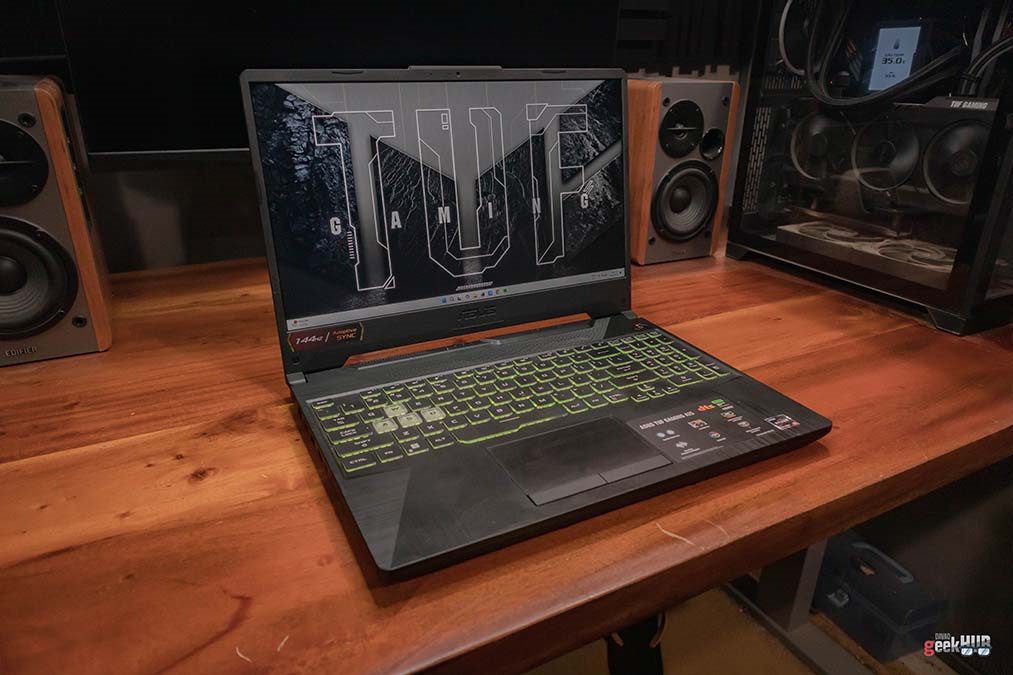
If you’re looking for a gaming laptop but are in a tight budget, consider getting an older model. This is my 2021 TUF Gaming A15 review.
This particular variant of A15 was launched a couple of years ago, so it’s not actually a new model. Older models are still quite capable and a more inexpensive choice. But how capable are they today? Let’s find out on this 2021 TUF Gaming A15 review.
Unboxing the TUF Gaming A15
Before I talk about the device itself, here’s what you should expect when you unbox the device. What’s included are pretty standard, we have the gaming laptop itself, its charger/power cord, and the paperwork (user guide, and warranty booklet). Depending on the promo, it could come with a free gaming mouse, and/or a backpack as well.
You can also check out my unboxing and impression video below.
Design and Build Quality


Though giving off a gaming machine vibe, it does look a bit minimal than most gaming laptop designs in the market. I’m not really a fan of the exaggerated designs that screams gamer to anyone who glances at the device, so I kind of like this lowkey look. I can easily pull this out on a coffee shop and work without distracting other customers of its lights. But because it’s primarily designed for gamers, it still has some gaming design elements, which I also appreciate as someone who also play videogames.
As a gaming laptop, it is quite bulky and heavy. So, you should also consider these things when choosing your next device. While it is a bit heavy, it does feel very sturdy. It has military standard durability after all. Which could be a plus for clumsy people such as myself.
Display

The A15 comes with a 15-inch FHD display with up to 144Hz Adaptive Sync support. This, paired with an RTX 2050, ensures that gameplay is smooth as butter. The panel is IPS as well as anti-glare, so you can be sure that the display will look great in all angles. Bezels are also thin, not as thin as ultrabooks but thin enough to be more immersed in the video or game you are playing.
Webcam Quality
Most laptop built-in webcams are not great, and this one is no exception. It only has a 720p resolution. It’s pretty decent for Zoom meetings, but quite bad to streaming. I guess it is passable for an impromptu on-the-spot stream/live video. But other than that, it’s better to invest in a better-quality webcam.
Audio Quality

While doing this ASUS TUF Gaming A15 review, I found the sound quality on its speakers pretty decent. It is facing upwards towards the user, so you can clearly hear the audio. But the maximum volume is not that loud. It’s not a problem when you’re gaming or in a Zoom meeting, since you’ll probably be using a headset anyway. But for when watching a movie/video or listening to music along in your room, it’s not loud enough to fill the room. I found myself using a separate Bluetooth speaker instead.
Like most ASUS devices, the A15 also has two-way AI Noise Cancellation. It let users remove noise from their mic input, as well as incoming feeds. This is very helpful during Zoom meetings, as well as when streaming your favorite games.
Keyboard and Trackpad

Like most laptops, it has a chiclet keyboard with RGB backlighting. It has a full keyboard layout which means it’s pretty tight spaced. It is fine for me, but may be susceptible to accidental button press on some people. The laptop also has a typical trackpad, the ones you’ll find in most gaming laptops. It is responsive enough for everyday tasks, and can also recognize multi-finger gestures well. But it does pick up oil from your fingers, so you need to clean it regularly. It’s not much of a problem, especially when gaming, though since you’ll most likely use a mouse, or better yet a controller.
I/O Ports


Gaming laptops usually have a lot of I/O ports, and this one is no exception. It has 3x USB 3.2 Gen 1 Type-A ports, 1 USB 3.2 Gen 2 Type-C with DisplayPort support, HDMI 2.1, RJ45 LAN port, a combo audio jack, and an SD card slot.
Day-to-Day Performance
Consumers may have different priorities when choosing their laptop, so I decided to divide my opinions about the device’s performance from day-to-day use and gaming. For day-to-day task such as school work, it performs perfectly thanks to its powerful . I even use it often on creative work such as photo and video editing with Adobe Photoshop and DaVinci Resolve, and it actually renders fast. Aside from the Ryzen 5 7535HS, I thing its 8GB DDR5 RAM and 512GB NVMe SSD storage also played a part in its performance
I also wanted to benchmark it on Cinebench but I keep getting this error.

But I did benchmark PCMark and it scored 5272 points.
Gaming Performance

For games it performs really well, as it should since it’s a gaming laptop after all. It’s equipped with an NVIDIA GeForce RTX 2050 laptop GPU. It’s actually the lowest tiered GPU among the A15 2021’s variants. But even so, it does perform well in high settings. Other variants offers RTS 30 series GPUs so you might want to opt for those if you feel the 2050 is lacking. But if you ask me, it performs fine, especially if you are in a budget.
For 3DMark benchmark results, it scored 3132 on Steel Nomad Light, 4194 on Time Spy, and 9152 on Fire Strike. For Heaven and Furmark benchmarks, it scored 2655 and 2540 respectively. I’ve also tested the device in different games on my library. I mostly spent more of my time playing the GTA V because I got immersed in it. Below are the benchmark results.
Cooling and Fan Noise
Since it is a gaming laptop, it’s a bit bulky. And it’s because of its comprehensive cooling. Inside are four heat pipes and three heatsinks which draw heat away and dissipates it quickly. It also feature self-cleaning cooling 2.0, which releases dusts from the inside. We can’t know how well it works for now though. It does cool the internals very well though.
But when gaming for long periods of time, the fans tend to spin load. You can hear it over the speakers, which can get annoying at times. The fan noise is actually not too loud, it’s just that the speaker are a bit too low as well. It’s not very noticeable if you have headphones on though.
Battery Life
Battery life on the TUF Gaming A15 is very typical. It can run for about 2 hours, more if you disable the RTX 2050 and just run it on the built-in GPU. It does drain fast when gaming though, so I suggest plugging it in when playing video games.
Upgradability


For upgrades, you can add more RAM as it has an open slot. It can be upgraded up to 32GB of DDR5 RAM. You can also add another M.2 SSD since it has one more open slot for it. Upgrading it can be quite a chore though, you have to remove the entire bottom of the device.
ASUS TUF Gaming A15 Specifications
| Dimensions | 35.9 x 25.6 x 2.28 ~ 2.45 cm (14.13″ x 10.08″ x 0.90″ ~ 0.96″) |
| Weight | 2.30 Kg (5.07 lbs) |
| CPU | AMD Ryzen™ 5 7535HS Processor 3.3GHz |
| GPU | NVIDIA® GeForce RTX™ 2050 Laptop GPU |
| RAM | 8GB DDR5-4800 SO-DIMM |
| Storage | 512GB PCIe® 4.0 NVMe™ M.2 SSD |
| Display | 15.6-inch, FHD (1920 x 1080) 16:9 Value IPS-level Anti-glare display sRGB:62.5%, Adobe:47.34% Refresh Rate:144Hz Adaptive-Sync Optimus |
| Audio | DTS software AI noise-canceling technology Hi-Res certification (for headphone) Built-in array microphone 2-speaker system |
| Camera | 720P HD camera |
| Keyboard and Touchpad | Backlit Chiclet Keyboard 1-Zone RGB Touchpad |
| I/O Ports | 1x 3.5mm Combo Audio Jack 1x HDMI 2.1 TMDS 3x USB 3.2 Gen 1 Type-A 1x USB 3.2 Gen 2 Type-C with support for DisplayPort™ 1x RJ45 LAN port |
| Connectivity | Wi-Fi 6 (802.11ax) Bluetooth® 5.3 Wireless Card |
| Operating System | Windows 11 Home |
| Battery | 48WHrs, 3S1P, 3-cell Li-ion |
| AC Adapter | ø6.0, 150W AC Adapter Output: 20V DC, 7.5A, 150W Input: 100~240V AC 50/60Hz universal |
| Colors | Graphite Black Eclipse Gray |
| Price | PHP 47,995 |
Verdict

So are old models still okay to purchase in 2024? Yes it is. My 2021 TUF Gaming A15 review has proved that it can still run most games in high settings, despite being 3 years old. It also performed well in day-to-day tasks, which makes it perfect for students who also wants to game. I would still recommend on getting one of the new models though, as those offer more value and futureproofing. But if you are in a tight budget, getting the older ones such as the 2021 model of the TUF Gaming A15 is still perfectly fine.
If you are interested in getting the 2021 ASUS TUF Gaming A15, it is still available in ASUS Concept Stores and retailers nationwide, as well as online. Link below.
Summary
ASUS TUF Gaming A15 2021- Build and Design3.5/5 Just AlrightMinimalist gamer aesthetics with a sturdy build
- Display4.5/5 Very GoodGreat looking IPS display with smooth 144Hz refresh rate
- Audio3/5 MehAudio sounds decent but max volume is lacking
- Performance and Gaming4/5 GoodPerforms well and can handle games in high settings
- User Experience3.5/5 Just AlrightA bit bulky and heavy for everyday use
- Upgradability4/5 GoodAdditional slots for another RAM stick and M.2 SSD
The Good
- Sturdy build
- Smooth 144Hz refresh rate display
- Affordable than newer models
The Bad
- Bulky
- Subpar webcam
- Insufficient speaker volume